GPU Service Instance Types
GPU Service Instance Types describe the compute shapes — CPU-only or accelerator-backed — that GPU Service Instances can be created from.
Unlike the other GPU Service resources, instance types are not created by hand. The GPUStack Operator discovers the hardware of every node in a cluster and generates the instance types automatically. They appear as the cards in the leftmost column of the Add GPU Instance form.
There is no dedicated UI page to edit instance types. Instead, you tune them as an administrator with kubectl, by editing each node's NodeFeature resource on the target Kubernetes cluster (detailed below). This page covers those operations.
How Instance Types Are Generated
For every node, the Operator derives two kinds of capacity views:
- A general (CPU-only) view, shared by all nodes of the same OS and architecture. Its key is
generic-ln-x64here (ln= Linux,x64= amd64). It backs the CPU-only instance type. - One accelerator view per distinct device model on the node — for example
nvidia-tesla-t4ornvidia-a10g. Each backs an instance type for that model.
Each view reports the node's resources through labels — .cpu, .ram, and .storage — and those values drive the generated instance type. The Operator also writes derived z-flavor, z-queue, and z-cohort labels; you do not set those.
Warning
Every view reports the node's full CPU, RAM, and storage. A node that has accelerators therefore advertises its whole machine to its CPU-only view and to each accelerator view at the same time. This is intentional — it lets you pack a CPU-only instance and a GPU instance onto the same node — but it means a node's capacity is offered more than once, so the totals across instance types can be over-subscribed. Right-Size a Node shows how to bound this.
Inspecting Instance Types
List the instance types generated across the cluster:
- NAME encodes the general key, the per-instance unit (
12c-46g= 12 CPU and 46 Gi RAM per device), the accelerator key, and the device count per instance (1d). A name without an accelerator segment (…-1c-2g) is the CPU-only type. - ACCELERATOR, CPU, RAM, and LOCAL-STORAGE are shown as
largest single request / remaining. - PHASE is
Active,Activating, orInactive. A draining type reportsInactiveand zero capacity.
The Operator publishes each node's capacity labels in a NodeFeature resource named <node-name>-gpustack-worker in the gpustack-system namespace; Node Feature Discovery mirrors them onto the node, and the scheduling chain reads them from there. This NodeFeature is also where you tune a node (see Tuning Instance Types).
Inspect the labels of a node — for example, the node with four Tesla T4 devices:
This node exposes both a general view (generic-ln-x64, claiming the full 48 CPU / 96 Gi) and a Tesla T4 view (nvidia-tesla-t4, claiming the full 48 CPU / 186 Gi across its 4 devices) — the over-subscription described above. The labels you edit are gpustack.ai/managed and each view's .cpu, .ram, and .storage. The .z-flavor, .z-queue, .z-cohort, and =true marker labels are derived by the Operator — leave them alone.
Tuning Instance Types
You tune instance types by editing the spec.labels of a node's <node-name>-gpustack-worker NodeFeature. The Operator reads your gpustack.ai/managed, .cpu, .ram, and .storage values, recomputes the affected instance types, and re-publishes them.
Note
Edit the NodeFeature, not the node. Node Feature Discovery owns these labels on the node and reverts any change made there directly.
A few rules apply to the values you set:
- Setting any of a view's
.cpu,.ram, or.storageto0removes that view's instance type from the node entirely. - RAM is rounded up to an integer number of Gi and is never set below the CPU count.
- Storage is rounded down to an even number of Gi.
Warning
Changing a node's labels reshapes or removes the instance types it backs. When an instance type is removed (or drained to zero capacity), GPUStack evicts the GPU Service Instances running under it and marks them Stopped. Stopped instances are not restarted automatically — you start them again from the GPU Service Instances page once a matching instance type is available. An instance's Type itself cannot be changed yet; reconfiguring the Type of a Stopped instance is planned for a future release. Apply these changes during a maintenance window.
Exclude a Node
Set gpustack.ai/managed to false to take a node out of GPU Service entirely. The Operator stops generating instance types from it, so no new instances are scheduled there, and any instance already running on the node is stopped.
After the Operator reconciles, the instance types backed solely by this node drop to zero capacity, and any pooled type (such as the CPU-only type) loses this node's share:
Node ip-172-31-2-89 was the only node backing …-4c-16g--nvidia-tesla-t4-1d, so that type now reports 0/0 capacity: in the Add GPU Instance form its Tesla-T4 card (16 GB RAM, 4 CPU) shows Max 0 and can no longer be selected. The CPU-only type (…-1c-2g) keeps running but drops from 71 to 67 CPU as this node leaves the shared pool.
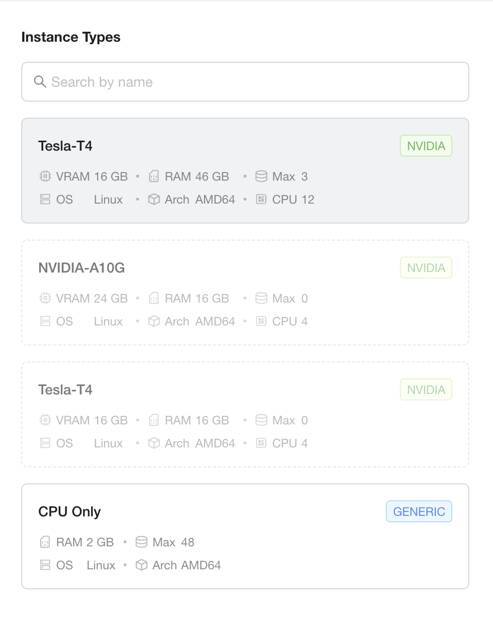
To bring the node back, set the label to true again:
Disable the CPU-Only Type on a Node
A node with accelerators also offers a CPU-only instance type by default. To stop a node from offering CPU-only instances — for example, to reserve a GPU node for GPU workloads only — set its general .cpu to 0:
The CPU-only type is pooled across every node, so it stays available — it just loses this node's share. Node ip-172-31-2-137 contributed 48 CPU and 96 Gi to the pool, so the type's remaining capacity drops by exactly that much (CPU 71 → 23, RAM 142Gi → 46Gi), and the largest CPU-only instance you can launch shrinks because the 48-CPU node left the pool:
In the Add GPU Instance form, the CPU Only card's Max drops from 48 to 15.
Note
A CPU-only instance already running on the node keeps running — opting the node out only stops new CPU-only instances from landing there. Running instances are stopped only when a type is removed entirely and drains to zero.
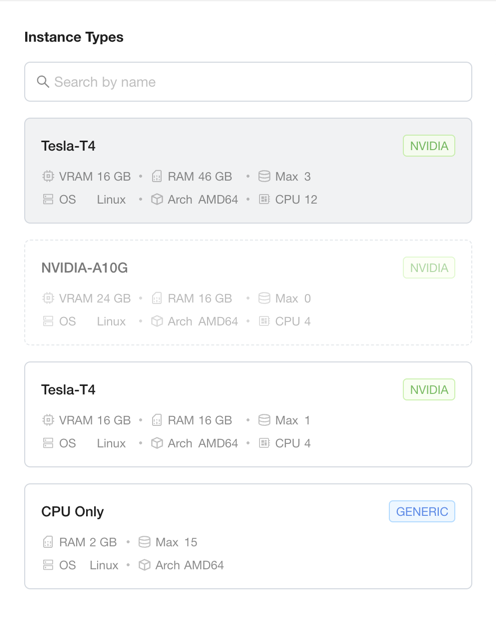
Revert by removing the override; the Operator restores the discovered value:
Right-Size a Node to Avoid Over-Subscription
Because every view reports the node's full machine, a node's CPU-only type and each of its accelerator types all advertise the whole node. If you run a CPU-only instance and a GPU instance on the same node, their combined requests can exceed what the node actually has.
When you want a node split between CPU and GPU along a plan of your own — or want it used for GPU instances only — set explicit .cpu, .ram, and .storage on each view so their sums stay within the machine. The ratio is yours to choose. For node ip-172-31-2-137 (48 CPU, 186 Gi RAM, 98 Gi disk), this reserves a small slice for CPU-only instances and the rest for the four T4 devices:
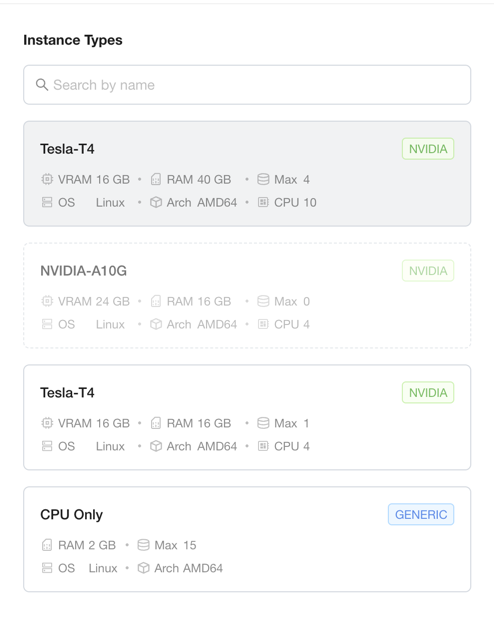
The sums (48 CPU, 176 Gi, 96 Gi) now fit the machine. The Tesla T4 type is reshaped from 12c-46g to 10c-40g per device (40 CPU / 160 Gi split across the 4 devices), and the node's CPU-only contribution shrinks to 8 CPU / 16 Gi:
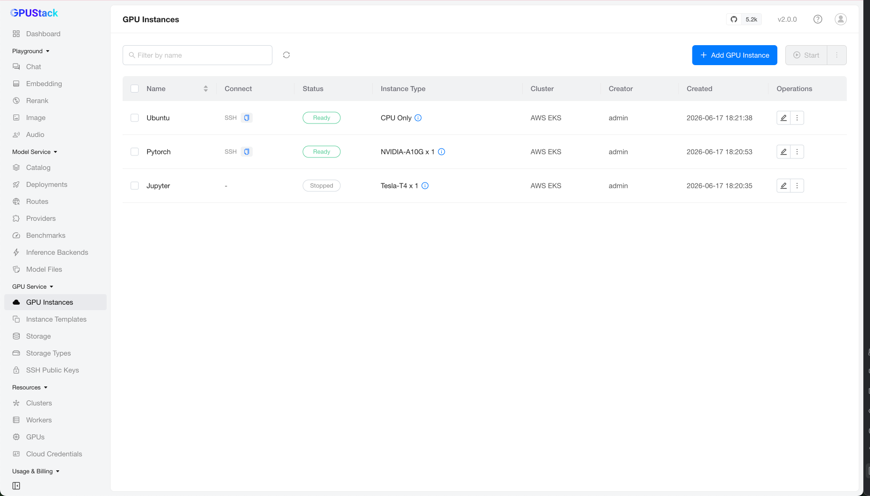
The original …-12c-46g--nvidia-tesla-t4-1d type no longer matches any node, so it is removed — and because the jupyter instance was running under it, that instance is evicted and marked Stopped:
Tip
To favor GPU workloads, give the accelerator view most of the machine and the general view a small slice (or 0, as in the previous section, to dedicate the node to GPU instances). Only the per-view sums need to stay within the node.
Revert by removing the overrides:
Once the original type is back, start the stopped instance again from the GPU Service Instances page.
Disable a Specific Accelerator Model on a Node
This is the accelerator counterpart of Disable the CPU-Only Type, and it is more surgical than Exclude a Node: it removes one accelerator model's instance type from a node while the node keeps serving its other types — the CPU-only type and any other accelerator models. Set the model's .cpu to 0:
Node ip-172-31-2-89 was the only node backing …-4c-16g--nvidia-tesla-t4-1d, so that type drops to zero. Unlike excluding the node, its CPU-only contribution stays in the pool — the CPU-only type holds at 48/71:
On a node with several accelerator models, this removes only the targeted model and leaves the others untouched.
Revert by removing the override: