工具调用可以将模型连接到外部工具和系统,例如为 AI 助手扩展能力,或在应用与模型之间构建深度集成。
本教程介绍如何在 GPUStack 中配置和使用工具调用,以扩展 AI 的能力。
说明
- vLLM 和 SGLang 推理后端支持工具调用。
- 工具调用本质上通过提示词工程实现,需要模型在训练中学习并内化相应模板。因此,并非所有 LLM 都支持工具调用。
前提条件
开始前,请确认:
- GPUStack 已安装并运行。
- 有一个配备 GPU 的 Linux Worker。本教程使用 Qwen2.5-7B-Instruct,需要显存至少 18GB 的 GPU。
- 可以访问 Hugging Face,以下载模型文件。
步骤 1:部署模型
从 Catalog 部署
Catalog 中支持工具调用的 LLM 标记为 tools 能力。选择这类模型时,默认会启用工具调用。
使用 llama-box 自定义部署的示例
使用 llama-box 部署 GGUF 模型时,支持工具调用的模型会默认启用该能力。
- 在 GPUStack 界面中打开
Deployments,点击 Deploy Model,在下拉菜单中选择 Hugging Face 作为模型来源。 - 勾选
GGUF,按 GGUF 格式筛选模型。 - 搜索
Qwen/Qwen2.5-7B-Instruct-GGUF。 - 点击
Save 部署模型。
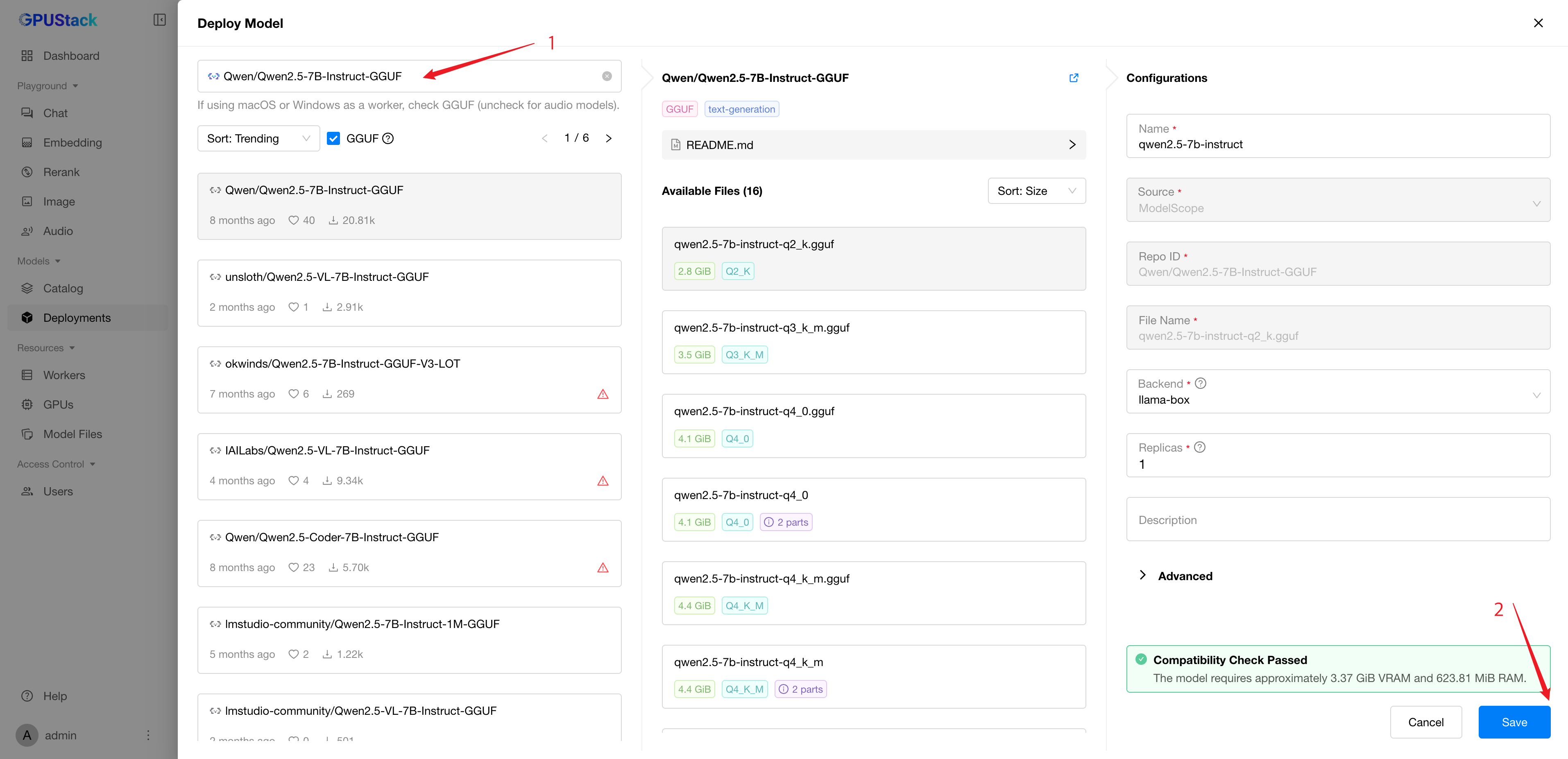
使用 vLLM 自定义部署的示例
使用 vLLM 部署模型时,需要通过额外参数启用工具调用。
- 在 GPUStack 界面中打开
Deployments,点击 Deploy Model,在下拉菜单中选择 Hugging Face 作为模型来源。 - 搜索
Qwen/Qwen2.5-7B-Instruct。 - 展开配置中的
Advanced,滚动到 Backend Parameters。 - 点击
Add Parameter,添加以下参数:
--enable-auto-tool-choice--tool-call-parser=hermes
- 点击
Save 部署模型。
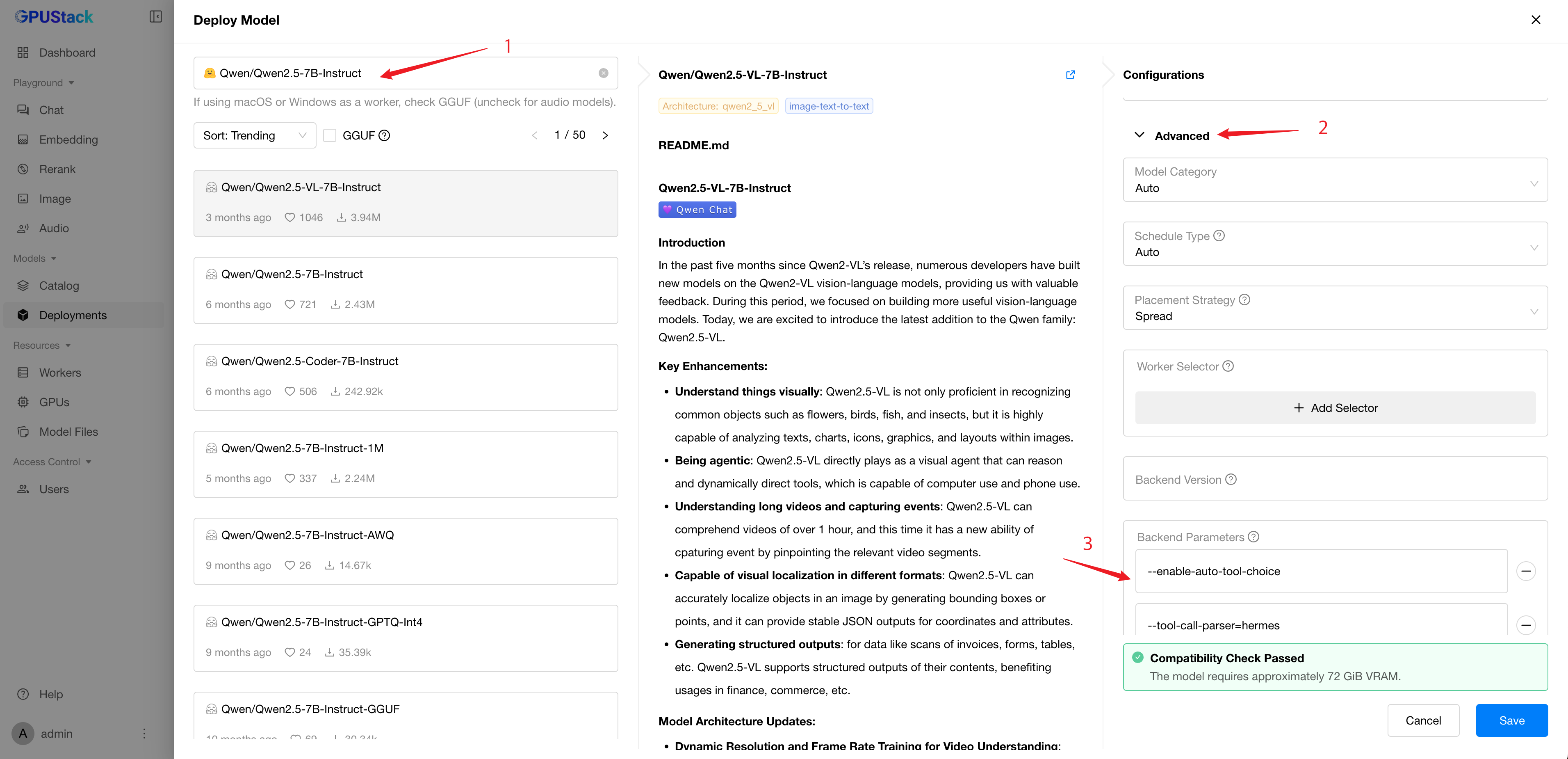
部署后,可在 Deployments 页面查看模型状态。
步骤 2:生成 API 密钥
通过 GPUStack API 调用模型前,需要生成 API 密钥:
- 打开
Access Control > API Keys 页面。 - 点击
New API Key。 - 输入密钥名称,点击
Save。 - 复制生成的 API 密钥,供后续使用。
步骤 3:执行推理
部署模型并取得 API 密钥后,即可通过 GPUStack API 调用模型。以下是使用 curl 的示例;将 <your-server-url> 替换为 GPUStack Server 的 URL,将 <your-api-key> 替换为上一步生成的 API 密钥:
| export GPUSTACK_SERVER_URL=<your-server-url>
export GPUSTACK_API_KEY=<your-api-key>
curl $GPUSTACK_SERVER_URL/v1-openai/chat/completions \
-H "Content-Type: application/json" \
-H "Authorization: Bearer $GPUSTACK_API_KEY" \
-d '{
"model": "qwen2.5-7b-instruct",
"messages": [
{
"role": "user",
"content": "What'\''s the weather like in Boston today?"
}
],
"tools": [
{
"type": "function",
"function": {
"name": "get_current_weather",
"description": "Get the current weather in a given location",
"parameters": {
"type": "object",
"properties": {
"location": {
"type": "string",
"description": "The city and state, e.g. San Francisco, CA"
},
"unit": {
"type": "string",
"enum": ["celsius", "fahrenheit"]
}
},
"required": ["location"]
}
}
}
],
"tool_choice": "auto"
}'
|
响应示例:
| {
"model": "qwen2.5-7b-instruct",
"choices": [
{
"index": 0,
"message": {
"role": "assistant",
"content": null,
"tool_calls": [
{
"id": "chatcmpl-tool-b99d32848b324eaea4bac5a5830d00b8",
"type": "function",
"function": {
"name": "get_current_weather",
"arguments": "{\"location\": \"Boston, MA\", \"unit\": \"fahrenheit\"}"
}
}
]
},
"finish_reason": "tool_calls"
}
],
"usage": {
"prompt_tokens": 212,
"total_tokens": 242,
"completion_tokens": 30
}
}
|