Single Sign-On (SSO) Authentication
GPUStack supports Single Sign-On (SSO) authentication methods such as OIDC, SAML, and CAS. This allows users to log in using their existing credentials from an external identity provider.
OIDC
Any authentication provider that supports OIDC can be configured. The email, name, and picture claims are used if available. The allowed redirect URI should include <server-url>/auth/oidc/callback.
If your OIDC provider uses a certificate issued by a private or corporate CA, see Additional Trusted CAs for how to mount CA certificates into the GPUStack container.
The following CLI flags are available for OIDC configuration:
Flag | Description |
|---|---|
--oidc-issuer | OIDC issuer URL. OIDC discovery under <issuer>/.well-known/openid-configuration will be used to discover the OIDC configuration. |
--oidc-client-id | OIDC client ID. |
--oidc-client-secret | OIDC client secret. |
--oidc-redirect-uri | The redirect URI configured in your OIDC application. This must be set to <server-url>/auth/oidc/callback. |
--external-auth-name (Optional) | Mapping of OIDC user information to username, e.g., preferred_username. By default, the email claim is used if available. |
--external-auth-full-name (Optional) | Mapping of OIDC user information to user's full name. Multiple elements can be combined, e.g., name or firstName+lastName. By default, the name claim is used. |
--external-auth-avatar-url (Optional) | Mapping of OIDC user information to user's avatar URL. By default, the picture claim is used if available. |
--external-auth-default-inactive (Optional) | Prevents new SSO users from being activated by default. |
--external-auth-post-logout-redirect-key (Optional) | Generic parameter name for post-logout redirection across different IdPs (e.g., Auth0 returnTo). Applied to both OIDC and SAML. |
You can also set these options via environment variables instead of CLI flags:
Example: Integrate with Auth0 OIDC
To configure GPUStack with Auth0 as the OIDC provider:
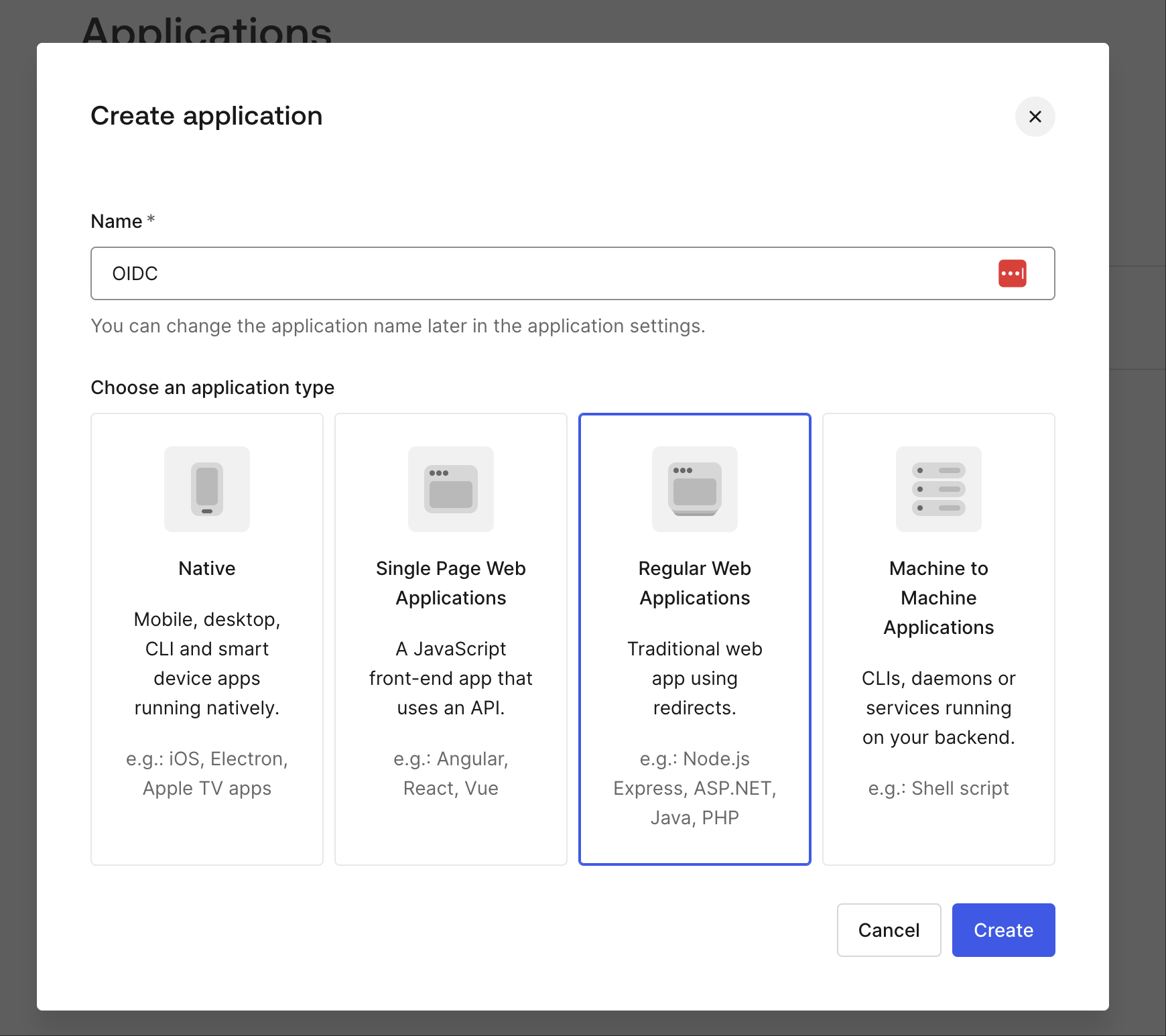
- Go to auth0 and create a new application with type
Regular Web Applications.
- Get the
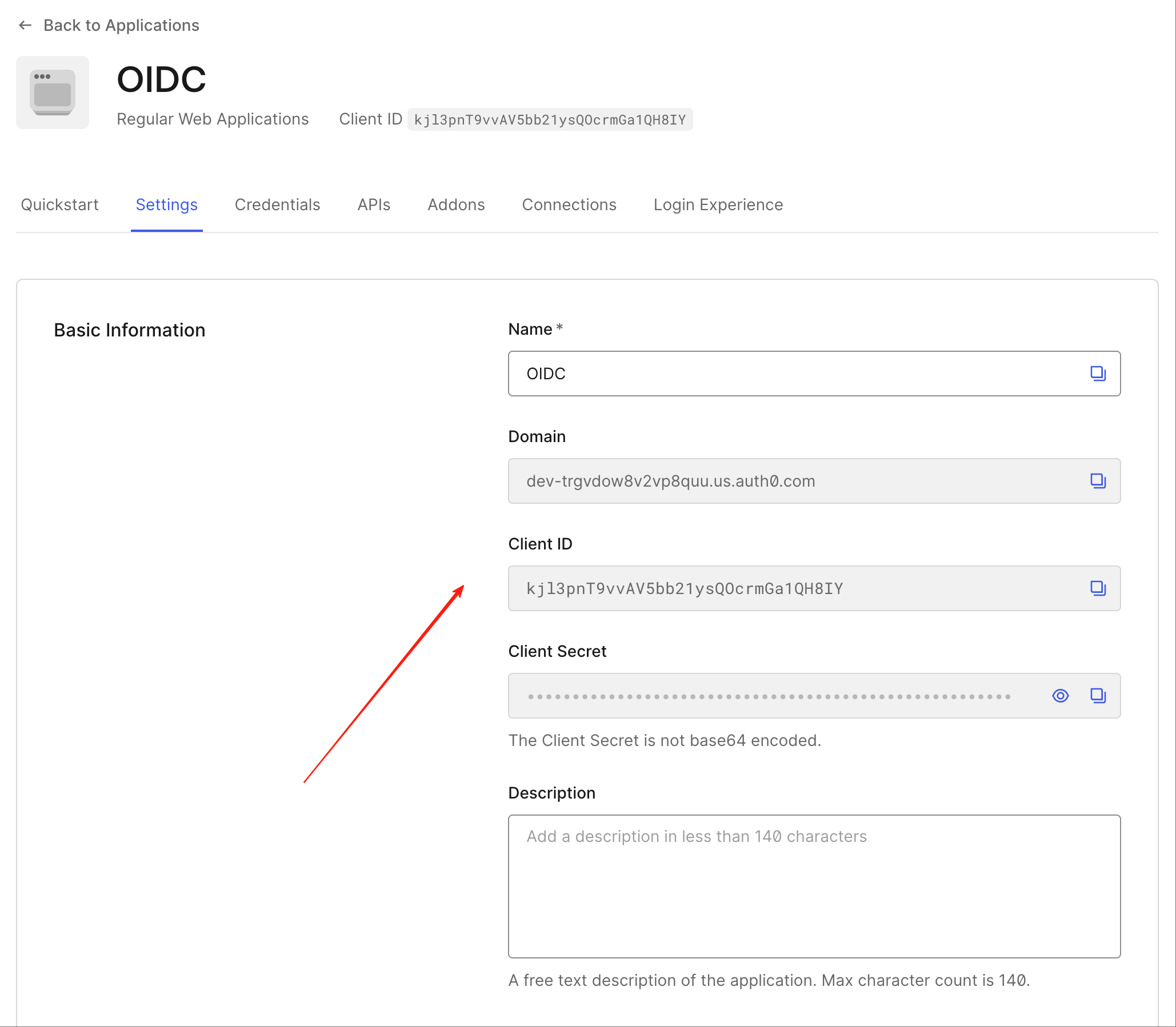
Domain,Client ID, andClient Secretfrom the application settings.
-
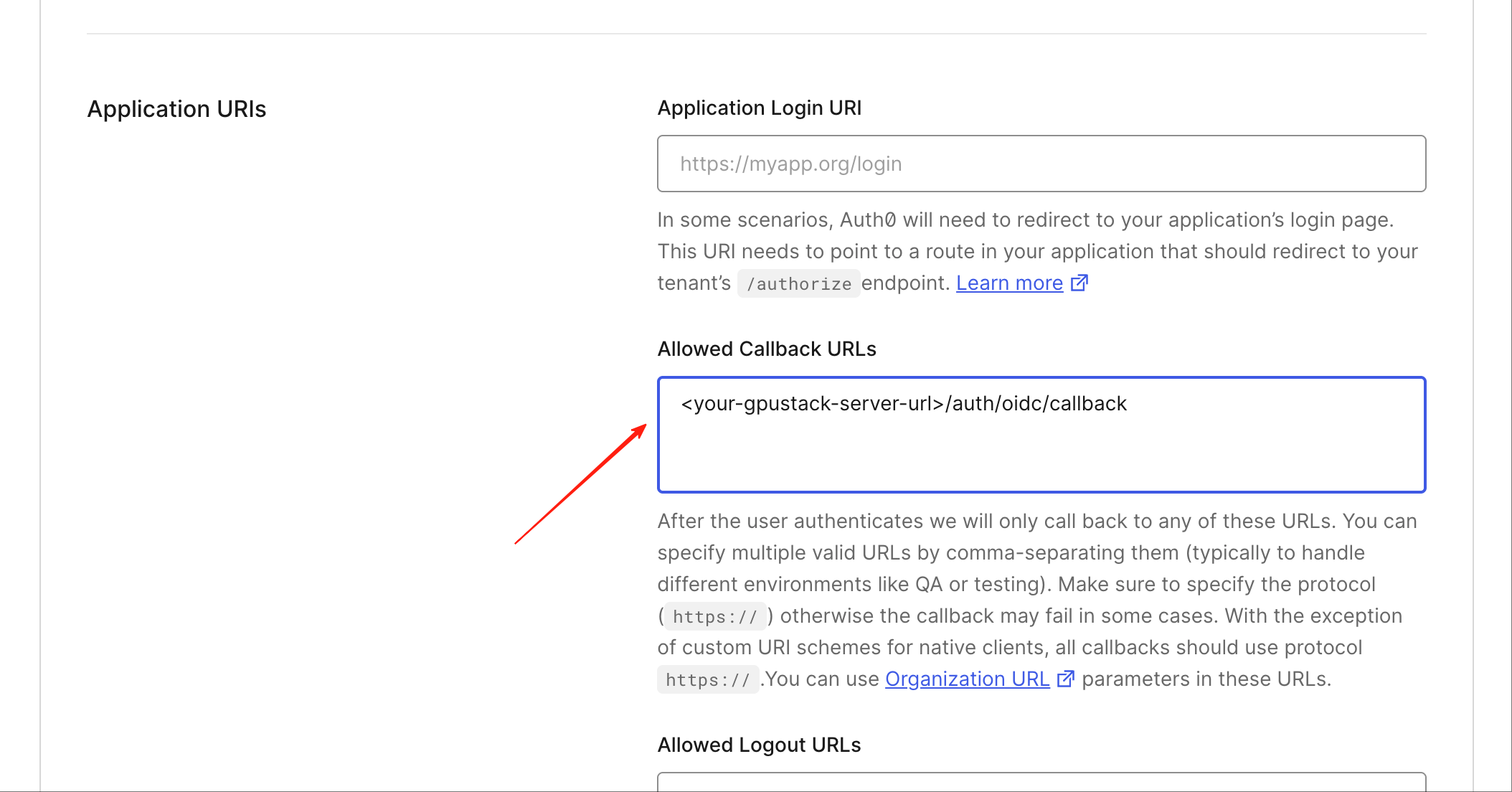
Add
<your-server-url>/auth/oidc/callbackin the Allowed Callback URLs. Adapt the URL to match your server's URL. -
In Allowed Logout URLs, add
<your-server-url>/(or your desired post-logout URL).
Then, run GPUStack with relevant OIDC configuration. The following example uses Docker with CUDA:
Note
The custom CA certificate mount is only required when your OIDC provider is signed by a private CA. Public OIDC providers such as Auth0 typically do not require it.
SAML
GPUStack supports SAML authentication for Single Sign-On (SSO). This allows users to log in using their existing credentials from an external identity provider that supports SAML.
The following CLI flags are available for SAML configuration:
Flag | Description |
|---|---|
--saml-idp-server-url | SAML Identity Provider server URL. |
--saml-idp-entity-id | SAML Identity Provider entity ID. |
--saml-idp-x509-cert | SAML Identity Provider X.509 certificate. |
--saml-sp-entity-id | SAML Service Provider entity ID. |
--saml-sp-acs-url | SAML Service Provider Assertion Consumer Service URL. It should be set to <gpustack-server-url>/auth/saml/callback. |
--saml-sp-x509-cert | SAML Service Provider X.509 certificate. |
--saml-sp-private-key | SAML Service Provider private key. |
--saml-idp-logout-url (Optional) | SAML Identity Provider Single Logout endpoint URL. |
--saml-sp-slo-url (Optional) | SAML Service Provider Single Logout Service callback URL (e.g., <server-url>/auth/saml/logout/callback). |
--saml-sp-attribute-prefix (Optional) | SAML Service Provider attribute prefix, which is used for fetching the attributes that are specified by --external-auth-*. e.g., 'http://schemas.auth0.com/'. |
--saml-security (Optional) | SAML security settings in JSON format. |
--external-auth-name (Optional) | Mapping of SAML user information to username. You must configure the full attribute name like 'http://schemas.xmlsoap.org/ws/2005/05/identity/claims/emailaddress' or simplify with 'emailaddress' by '--saml-sp-attribute-prefix'. |
--external-auth-full-name (Optional) | Mapping of SAML user information to user's full name. Multiple elements can be combined. You must configure the full attribute name like 'http://schemas.xmlsoap.org/ws/2005/05/identity/claims/name' or simplify with 'name' by '--saml-sp-attribute-prefix'. |
--external-auth-avatar-url (Optional) | Mapping of SAML user information to user's avatar URL. You must configure the full attribute name like 'http://schemas.auth0.com/picture' or simplify with 'picture' by '--saml-sp-attribute-prefix'. |
--external-auth-default-inactive (Optional) | Prevents new SSO users from being activated by default. |
You can also set these options via environment variables instead of CLI flags:
Example: Integrate with Auth0 SAML
To configure GPUStack with Auth0 as the SAML provider:
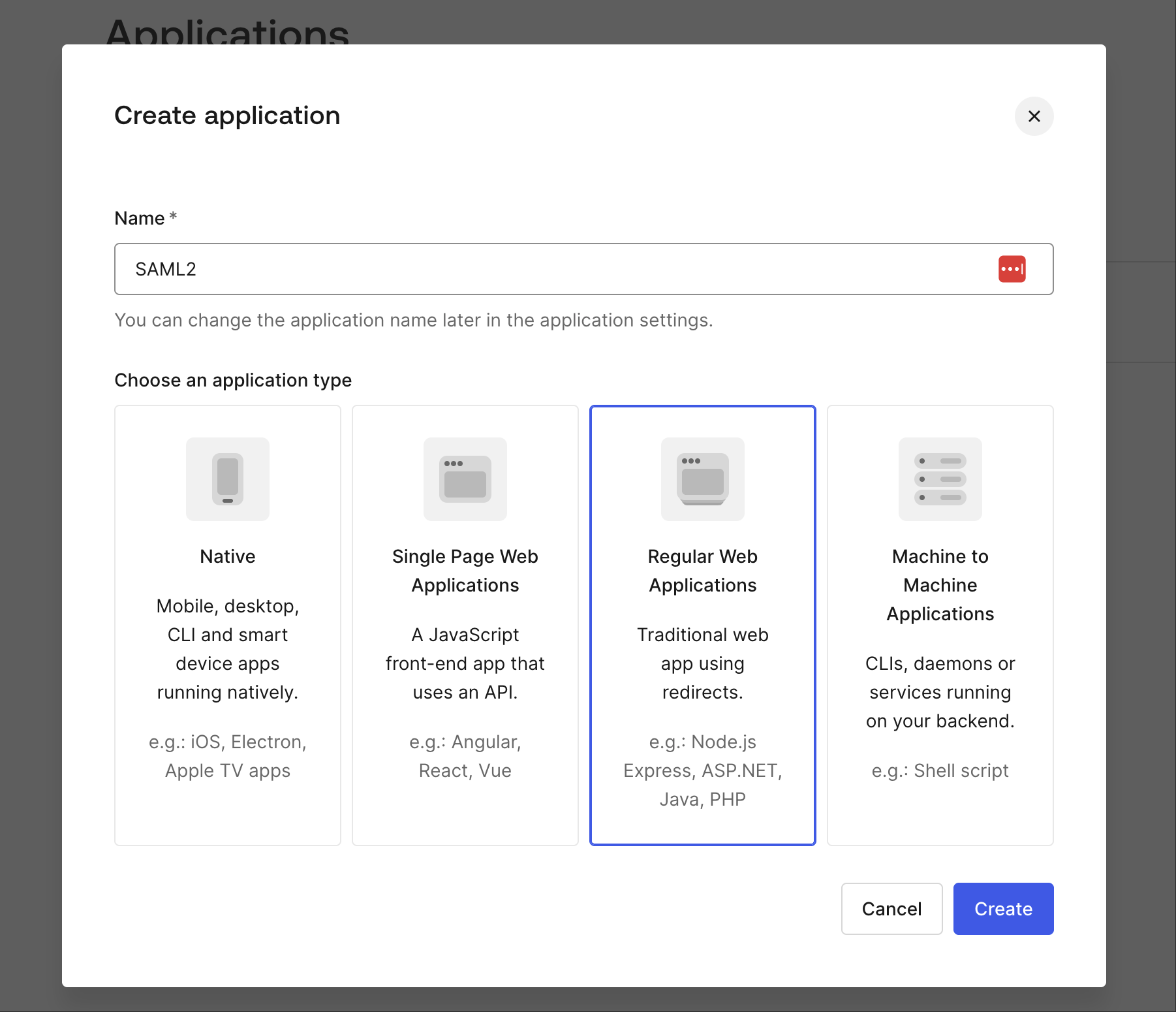
- Go to auth0 and create a new application with type
Regular Web Applications.
- Get the
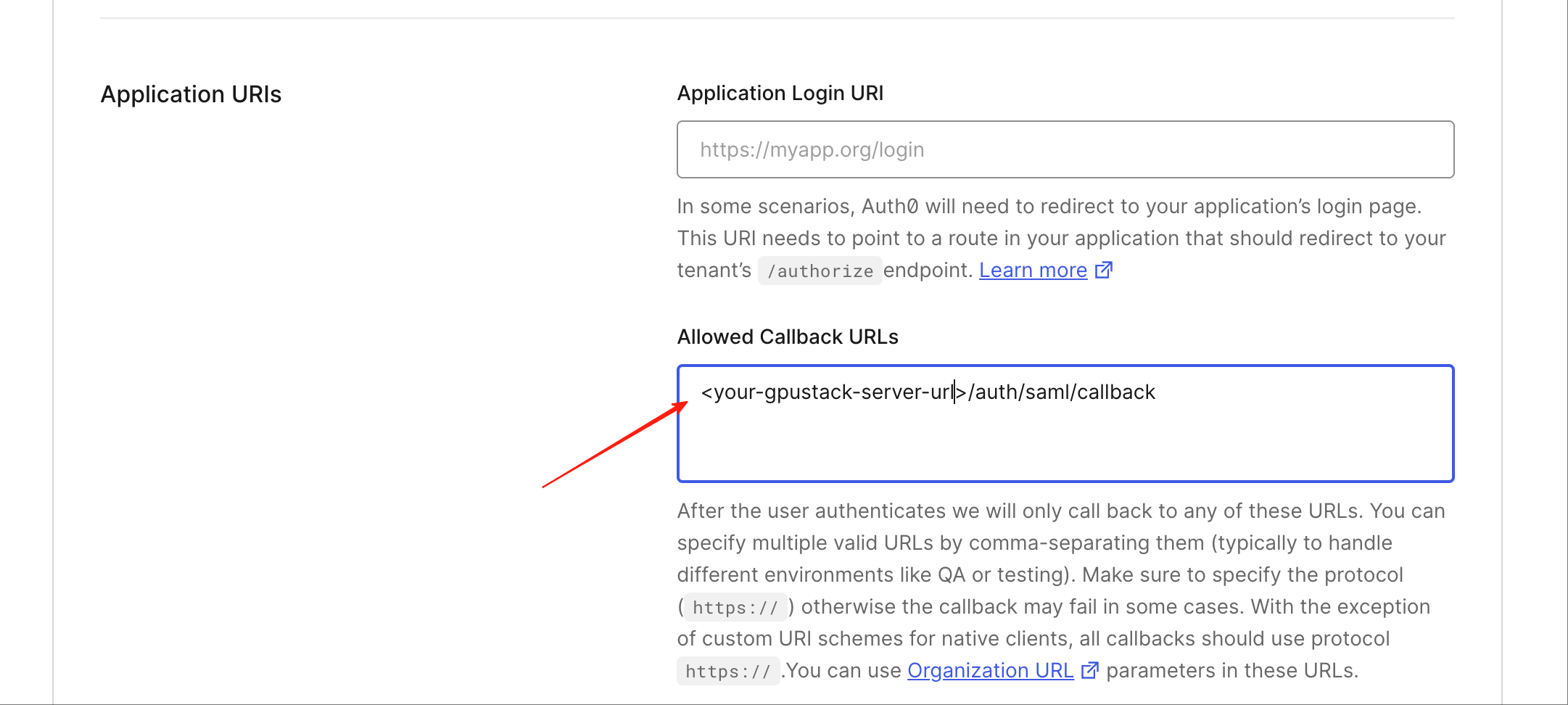
Domainfrom the application settings and add<your-server-url>/auth/saml/callbackin the Allowed Callback URLs. Adapt the URL to match your server's URL.
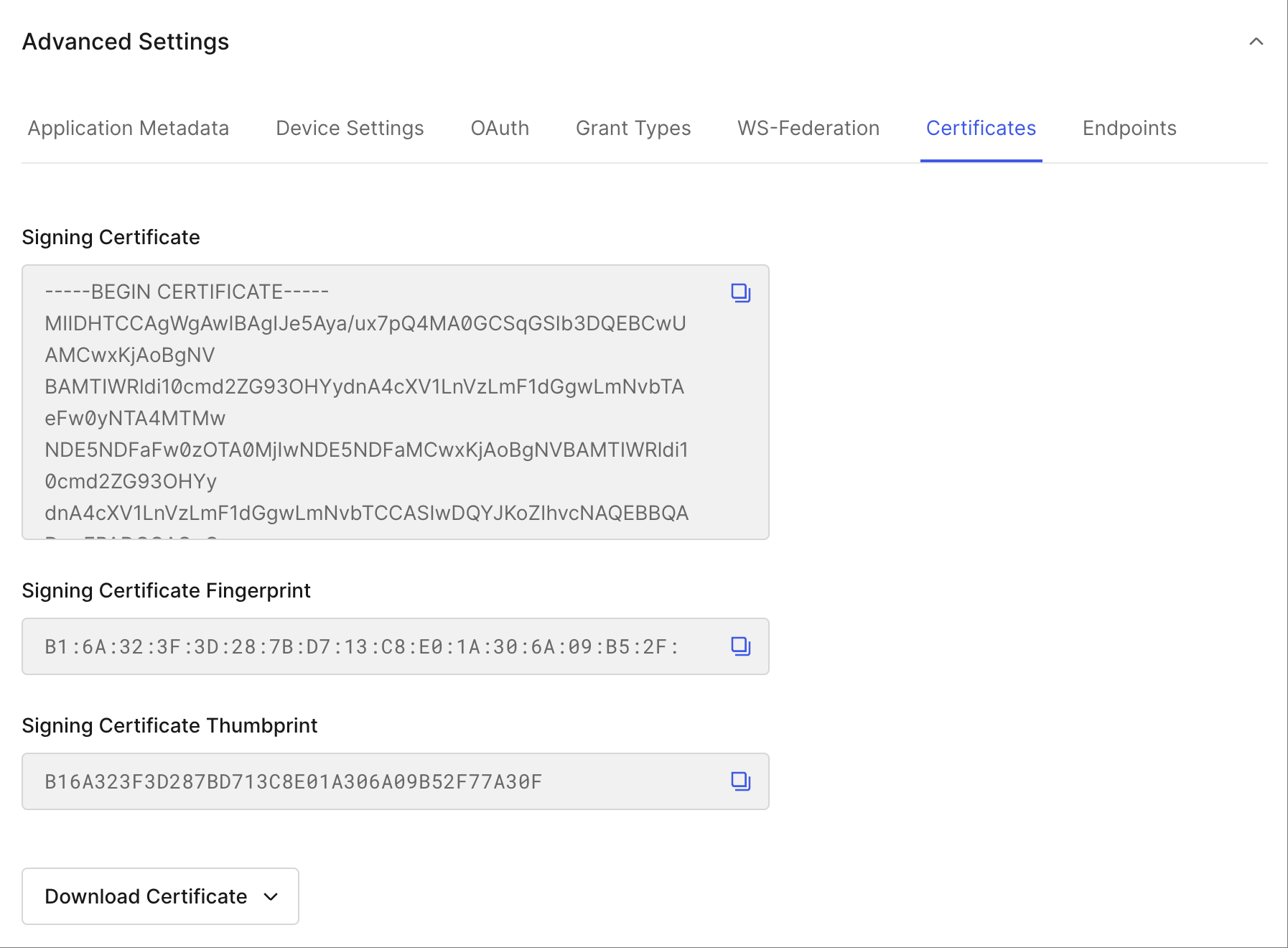
- In Advanced Settings → Certificates, copy the IdP
X.509 Certificate.
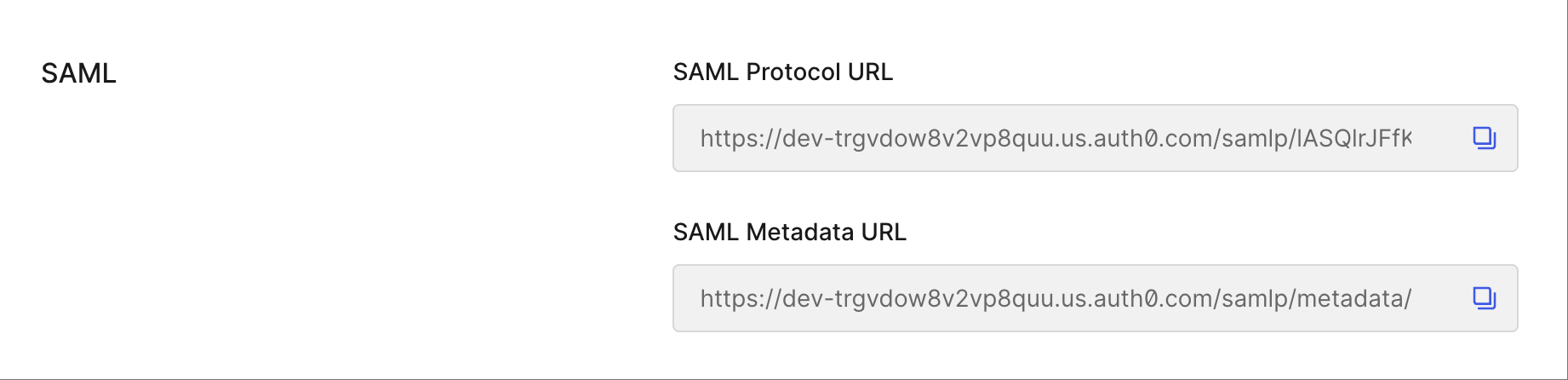
- In Endpoints tab, find the
SAML Protocol URL, which is your IdP server URL.
- Generate SP certificate and private key:
Note
myservice.cert and myservice.key will be used for the SP configuration.
- Run GPUStack with relevant SAML configuration. The following example uses Docker with CUDA:
Note
Not all IdPs provide standard SAML Single Logout (SLO). Auth0 SAML connections commonly do not expose singleLogoutService. If unavailable, GPUStack will still clear local sessions on logout; for full browser sign-out with Auth0, consider using its OIDC v2/logout with client_id and returnTo allowed.
CAS
Note
Modern Apereo CAS servers ship modules for OIDC and SAML2 alongside the native CAS protocol. If your CAS server has either enabled, you can also wire it up via the OIDC or SAML section above — capability is the same; pick whichever matches what your server actually exposes. The native CAS protocol below is the right choice when only CAS is available (common in older Apereo / education / government deployments) or when you want the smallest integration surface.
GPUStack supports CAS (Central Authentication Service) protocol versions 2.0 and 3.0. The login flow redirects the browser to <cas-server-url>/login?service=<gpustack-callback>; on success, GPUStack exchanges the returned service ticket via the standard /serviceValidate endpoint and provisions the user from the XML response. The callback URL registered with the CAS server should point to <server-url>/auth/cas/callback.
CAS responses are parsed with or without the cas: XML namespace, so most servers in the wild work without extra tuning. CAS Single Sign-Out is wired into /auth/logout and sends the browser to <cas-server-url>/logout?service=<server-external-url> when the active session originated from CAS.
The following CLI flags are available for CAS configuration:
Flag | Description |
|---|---|
--cas-server-url | CAS server base URL, e.g., https://cas.example.com/cas. Setting this enables CAS login. |
--cas-callback-url (Optional) | CAS callback URL registered with the CAS server. Defaults to <server-url>/auth/cas/callback at request time when unset. |
--cas-validate-endpoint (Optional) | CAS ticket validation endpoint, relative to --cas-server-url. Default: /p3/serviceValidate (CAS 3.0, returns user attributes). Use /serviceValidate only when targeting a pre-CAS-3.0 server. |
--cas-username-attribute (Optional) | CAS XML attribute name to use as the GPUStack username. Defaults to the CAS cas:user element when unset. |
--cas-full-name-attribute (Optional) | CAS XML attribute name to use as the user's full name, e.g., displayName. Falls back to a displayName attribute if present, otherwise the username. |
--cas-avatar-attribute (Optional) | CAS XML attribute name to use as the user's avatar URL. |
--external-auth-default-inactive (Optional) | Prevents new SSO users from being activated by default. |
You can also set these options via environment variables instead of CLI flags:
Example: Integrate with an Apereo CAS server
-
Register GPUStack as a service on the CAS server with
serviceIdmatching<your-server-url>/auth/cas/callback. Allow the attributes you intend to map (e.g.,uid,displayName). -
Run GPUStack with the CAS configuration. The following example uses Docker with CUDA:
Note
If your CAS server uses a certificate issued by a private or corporate CA, see Additional Trusted CAs for how to mount CA certificates into the GPUStack container.