Serving Models with LoRA Adapters
LoRA (Low-Rank Adaptation) is a parameter-efficient fine-tuning method that adapts a base model to a specific domain by loading small adapter files instead of retraining the full weights.
GPUStack lets you mount multiple LoRA adapters on a deployed base LLM and automatically creates one Model Route per adapter; callers switch adapters per request by setting the OpenAI-compatible model field to the corresponding route name, without dedicating a separate GPU to each fine-tune.
This tutorial shows how to attach multiple LoRA adapters to a single base model on the vLLM, SGLang, or Ascend MindIE backend, and how to invoke a specific adapter through the OpenAI-compatible API.
Note
LoRA is currently supported only on the vLLM, SGLang, and Ascend MindIE backends. The lora_list configuration is ignored on other backends.
Prerequisites
Before proceeding, ensure the following:
- GPUStack is installed and running.
- A Linux worker node with a GPU is available. The base model used here is
Qwen3-8B, so the GPU needs enough memory to serve an 8B model (for example, 24 GB or more). The two adapters share this same instance and add only a small amount of extra memory. - Access to Hugging Face for downloading the model and adapter files.
This tutorial mounts two LoRA adapters on a single base model so you can see how callers switch between fine-tunes per request. It uses the following configuration:
| Item | Value used in this tutorial |
|---|---|
| Model source | Hugging Face |
| Backend | vLLM |
| Base model | Qwen/Qwen3-8B |
| LoRA adapter 1 | AMaslovskyi/qwen-devops-foundation-lora (named devops) |
| LoRA adapter 2 | XinyuanWang/qwen3-8b-medical-lora (named medical) |
Both adapters declare Qwen/Qwen3-8B as their base model. This is a hard requirement: every adapter mounted on one deployment must share the same base model.
Tip
Once you have completed the tutorial with these values, you can swap in ModelScope or Local Path as the source, SGLang or Ascend MindIE as the backend, and your own base model and adapters. See Backend Compatibility & Limits for the per-backend differences.
Step 1: Deploy the Base Model with LoRA Adapters
- Navigate to the
Deploymentspage and clickDeploy Model, then chooseHugging Faceas the source. - In the search box, type
Qwen/Qwen3-8Band select it from the results. - Set the backend to
vLLM. -
Expand the
Advancedsection and locateLoRA Adapters. Add the first adapter:- In the adapter dropdown, type
AMaslovskyi/qwen-devops-foundation-loraand select it. - In the
LoRA namefield, enterdevops.
- In the adapter dropdown, type
-
Click to add the second adapter:
- In the adapter dropdown, type
XinyuanWang/qwen3-8b-medical-loraand select it. - In the
LoRA namefield, entermedical.
- In the adapter dropdown, type
-
Click
Saveto finish the deployment.
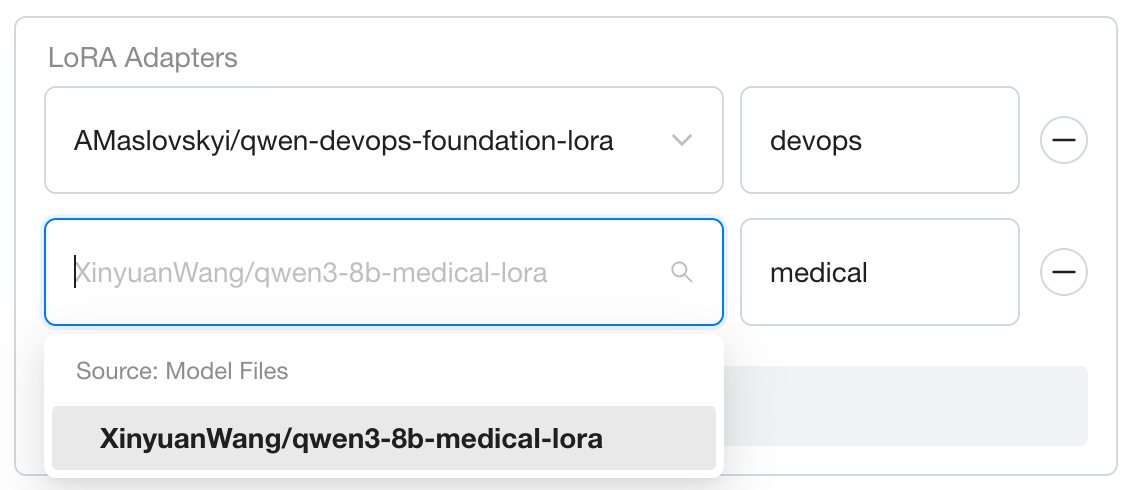
Note
Enter only the bare adapter name (devops, medical) without the base model prefix. GPUStack automatically derives the full identifier (qwen3-8b:devops, qwen3-8b:medical), which is also the Model Route name you use to invoke each adapter (see Step 2).
Tip
Each adapter needs a distinct LoRA name — to mount more, just repeat the add step. If an adapter you want does not appear in the dropdown, first confirm on Hugging Face or ModelScope that the model actually ships a LoRA adapter, then paste its full repository ID into the search box to select it.
Step 2: Invoke a LoRA Adapter
After deployment, GPUStack automatically creates a Model Route for each LoRA adapter, named <base-model-name>:<adapter-name>. In this tutorial that yields three routes — the base qwen3-8b, plus qwen3-8b:devops and qwen3-8b:medical. Each LoRA route appears alongside the base model's own Model Route on the Model Routes page and is tagged with a LoRA badge for easy identification.
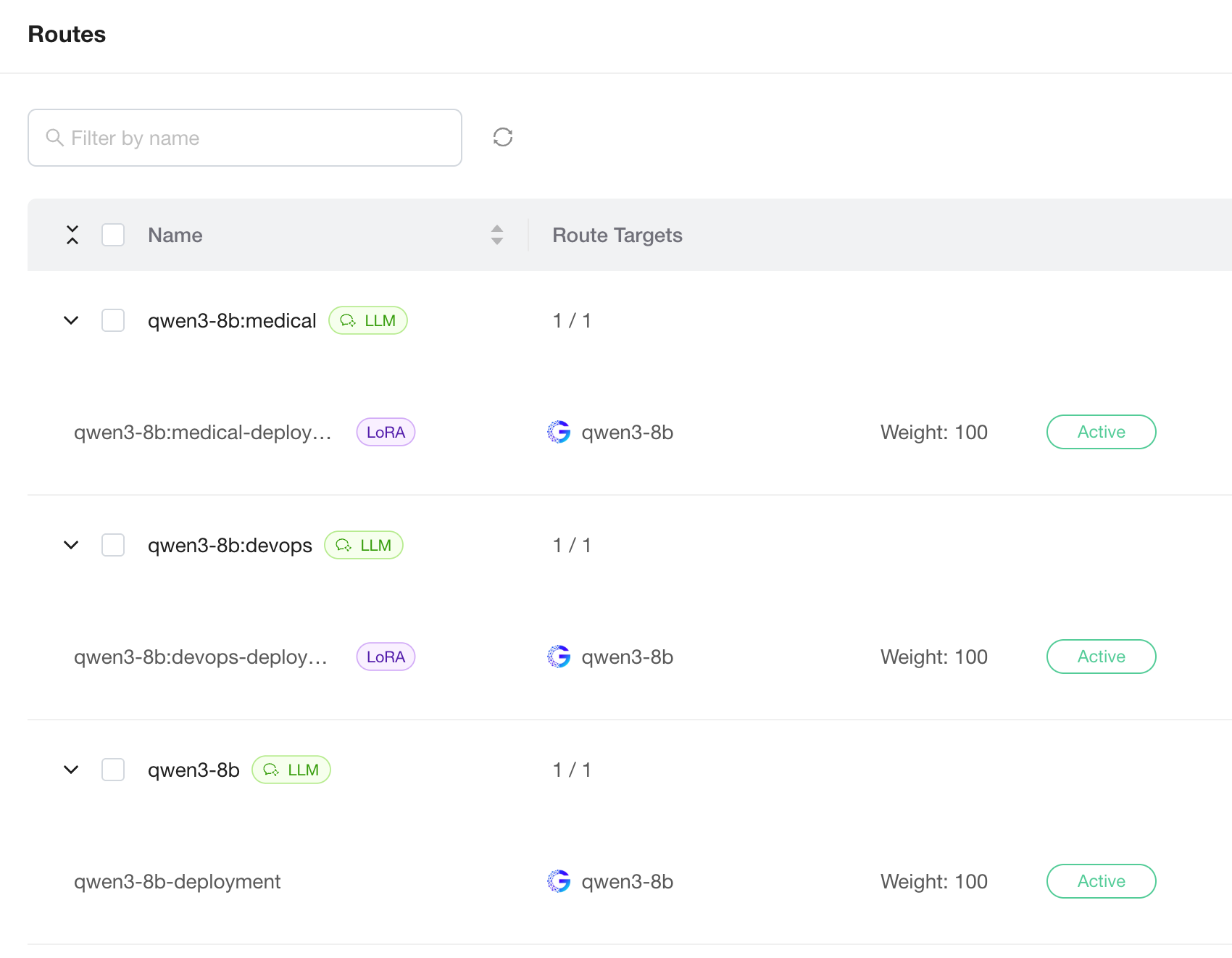
When you pick a model in Playground, the dropdown lists the base model and every LoRA adapter; switching the option routes the request to the corresponding adapter. The same applies through the OpenAI-compatible API — set the model field to the base model name or any adapter route name. Under the hood, all adapters share the same GPU instance, so switching between them is far cheaper than swapping models.
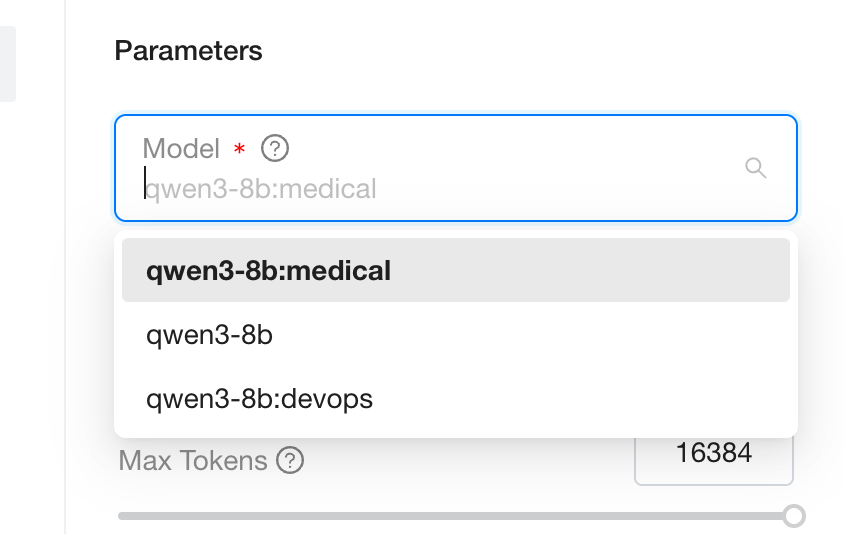
For example, the same prompt can be routed to either fine-tune just by changing the model field. Send the DevOps adapter a Kubernetes question:
Then route a clinical question to the medical adapter by changing only the model value:
Replace <your-gpustack-server> with your server address and <your-api-key> with an API key created on the API Keys page. Sending "model": "qwen3-8b" instead targets the base model with no adapter applied.
Step 3: Manage LoRA Adapters
You can adjust the LoRA configuration after the deployment is created:
- Add an adapter: Edit the deployed model and save. Instances already in the
Runningstate must be restarted before the newly added adapter is mounted and served. - Remove an adapter: Delete the corresponding entry from the deployed model. GPUStack automatically removes the matching Model Route once no
Runninginstance is still using the adapter. - Name conflicts: If two different base models add adapters whose names resolve to the same Model Route, submission is rejected with a conflict error. Rename one of the adapters to recover.
Backend Compatibility & Limits
LoRA support varies across inference backends:
| Backend | LoRA startup arguments / configuration | Key limits |
|---|---|---|
vLLM | --enable-lora, --max-loras, --lora-modules | --max-loras is set automatically from the lora_list length. The adapter count is fixed once the base model starts; changes require an instance restart. |
SGLang | --enable-lora, --lora-paths name=path, --max-loras-per-batch | The number of LoRAs activated simultaneously in one batch is limited by --max-loras-per-batch. |
Ascend MindIE | maxLoras / maxLoraRank / LoraModules in the config file | maxLoraRank defaults to 64; adapters with a higher rank fail to start. maxLoras=0 automatically equals the mounted adapter count. |
GPUStack injects these parameters automatically; you usually do not need to repeat them under Backend Parameters. Only override defaults (for example, raising maxLoraRank) by adding the flag under Advanced → Backend Parameters.
For full details and limits, see each backend's official documentation:
- vLLM: LoRA Adapters
- SGLang: LoRA Serving
- Ascend MindIE: Multi-LoRA (Chinese only)